

At a glance
- 14 weeks from the first line of code to the last hour logged in our old time tracker.
- One person at a time: the old system kept running for everyone who hadn’t moved yet. Turning it off was the last step, not the first.
- AI drafts, people decide: receipts, proposals and statements of work become drafts a person approves, and the category the AI suggests is recorded next to the one people keep.
On June 22, someone at Base22 logged a few hours in our old time tracker. It was the last entry we ever logged there. From the following week on, every hour and every invoice at the company went through Jarvis, the operations platform we started building on March 13.
There was no switchover weekend, no data freeze and no launch email. That’s the part of this story we think is worth telling.
We outgrew the patchwork
Like most professional-services firms, we ran the business on a handful of good tools, each doing one job: a time and expense tracker, an accounting system, and a set of spreadsheets and smaller tools for pipeline, client records, cash flow and equipment. Each tool was fine on its own. The trouble was the gaps between them. Getting from a proposal to an estimate, a project, weekly hours, an invoice and a cash forecast meant re-typing the same facts in several places and hoping they still matched.
So we built one system that holds the whole chain: proposal → estimate → won → project plan → weekly time and approvals → invoice → cash forecast.
We kept our accounting system. Jarvis doesn’t replace it; it posts to it. Once finance runs a period, approved employee expenses become reimbursement bills in QuickBooks Online, and the books stay where our accountants want them.
A small team built Jarvis with AI coding agents as part of the workflow. About three of every four of its roughly 770 commits were written with an AI assistant, with an engineer deciding what shipped. The agents drafted; engineers decided. It’s the same rule we apply to the AI inside the product.
The cutover: one person at a time
Most system migrations fail at the switchover, not in the software, so we didn’t plan one. The old tracker kept syncing into Jarvis for everyone who hadn’t moved yet, which kept every report complete while people crossed over one by one. It ran in four phases:
- Safety first. Before any real person touched it, we built an email safety gate. On a test system, mail to anyone outside a short allowlist is logged and never sent. A rehearsal should never send a client an invoice.
- A pilot on a development copy, with real users, to rehearse the whole cycle before anything counted.
- A pilot in production, with a finish line. From March, a few people at a time logged their real hours in Jarvis, and each had to complete one full cycle, enter → submit → approve → invoice, before we called them moved.
- A company-wide wave, on a week boundary. In the last week of May the old tracker still held about four of every five hours logged. By the end of June it held none.
We also cleaned up the past instead of leaving it behind. More than 17,700 internal hours logged since 2021 were relabelled into one clean taxonomy, with hours and costs untouched, so our reports read correctly years back, not just from launch day forward.
Invoicing moved as well. Every invoice we’ve issued since June was created in Jarvis, not imported from another tool.
A week in the life of a project manager
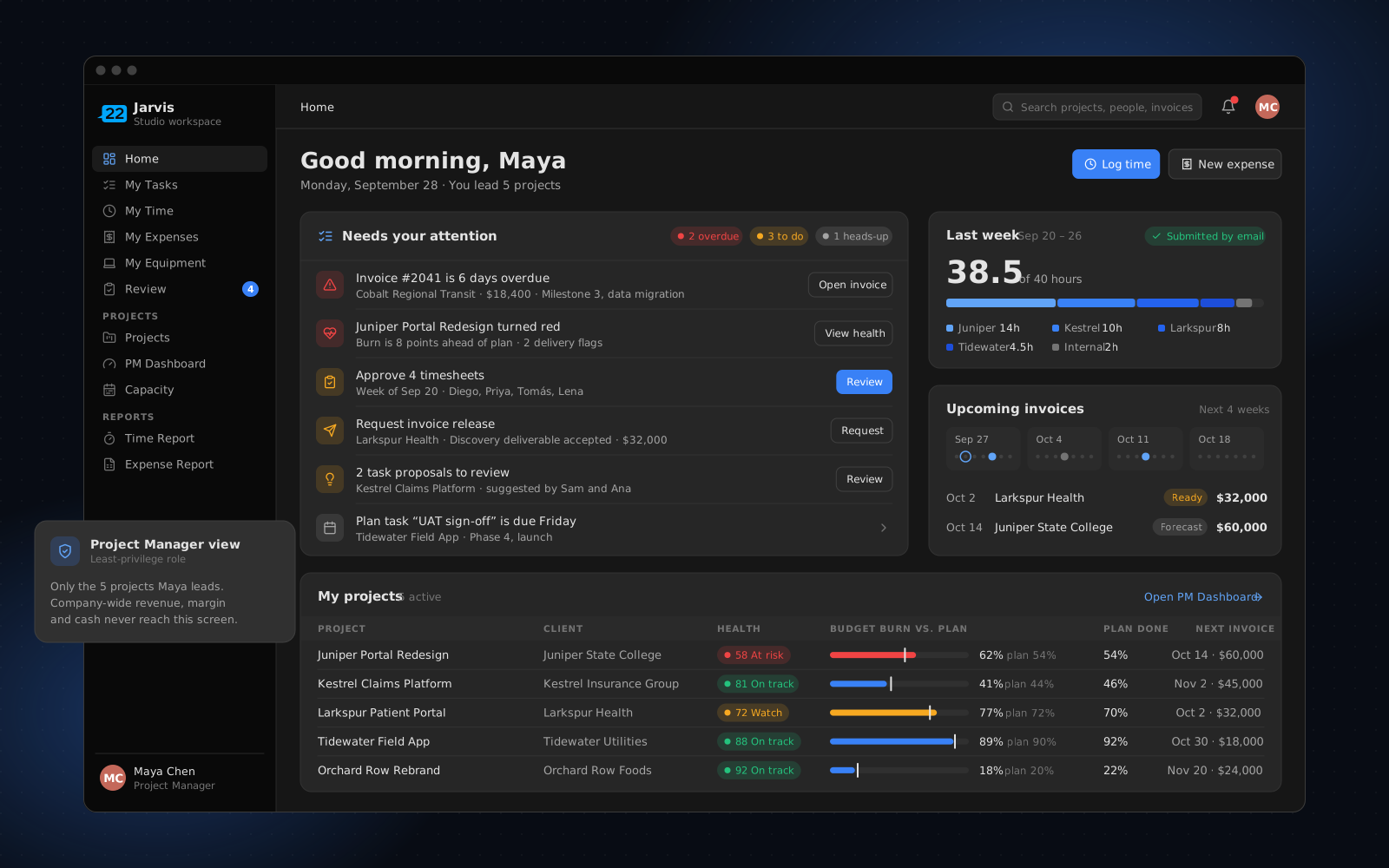
The project manager’s view is where Jarvis earns its keep, so we designed it around what a PM actually does in a week. A PM works on their own projects: the budget, burn and margin of the work they run. Company-wide revenue, margin and cash stay with finance.
Monday. Everyone on the team gets an email with last week’s hours already drafted. One link opens the week for review, with no login, and one button submits it. Home shows the PM a to-do list rather than a reporting portal: whose timesheets are waiting, which project is burning faster than planned, and which task changes the team has proposed.
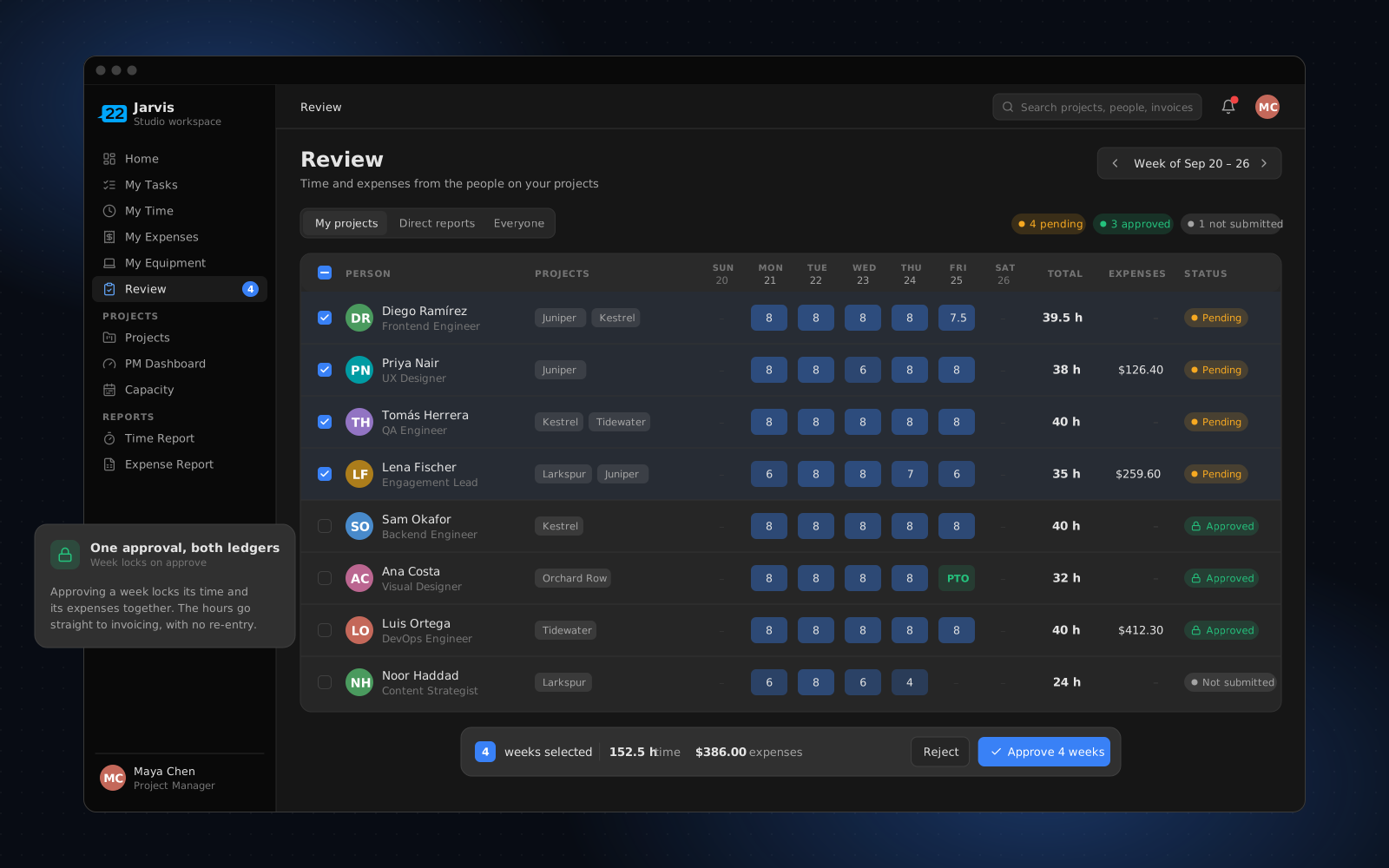
Early in the week. The PM approves their team’s time and expenses together, only for their own projects, and chases whoever hasn’t submitted. Once every project on a person’s week is approved, the week locks, so the numbers finance sees don’t shift afterwards.
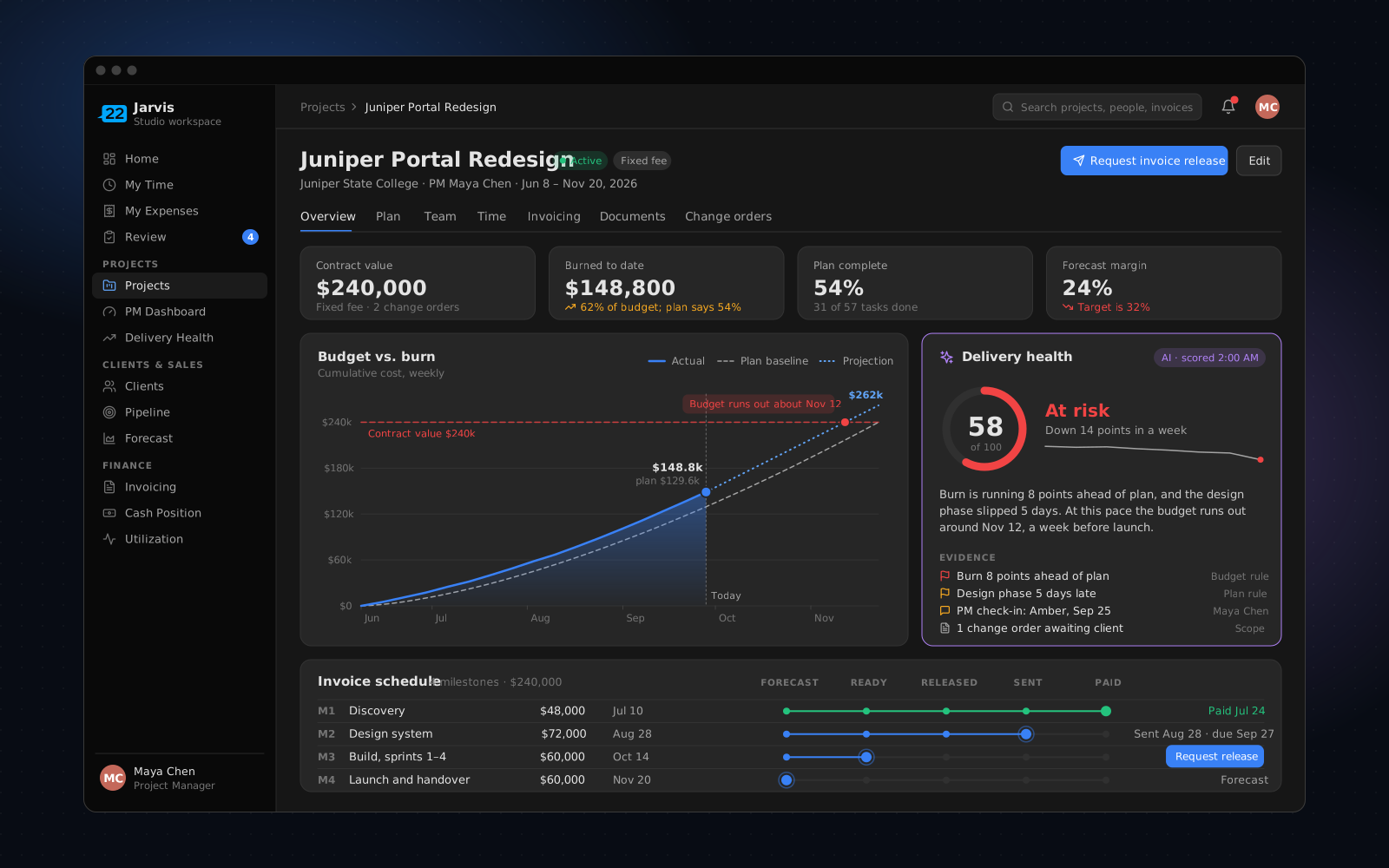
Midweek. Budget against burn is one screen per project, next to a delivery-health score that’s recalculated every night. When a deliverable lands, the PM requests the release of its invoice from the project instead of emailing finance.
Whenever a deal closes. One click turns a won opportunity into a live project with its plan, budget baseline and invoice forecast already in place. The PM starts from the estimate the client agreed to, not a blank page.
AI drafts. People decide. Everything leaves a trail.
That’s how we use AI in client work at Base22, and Jarvis follows the same rule.
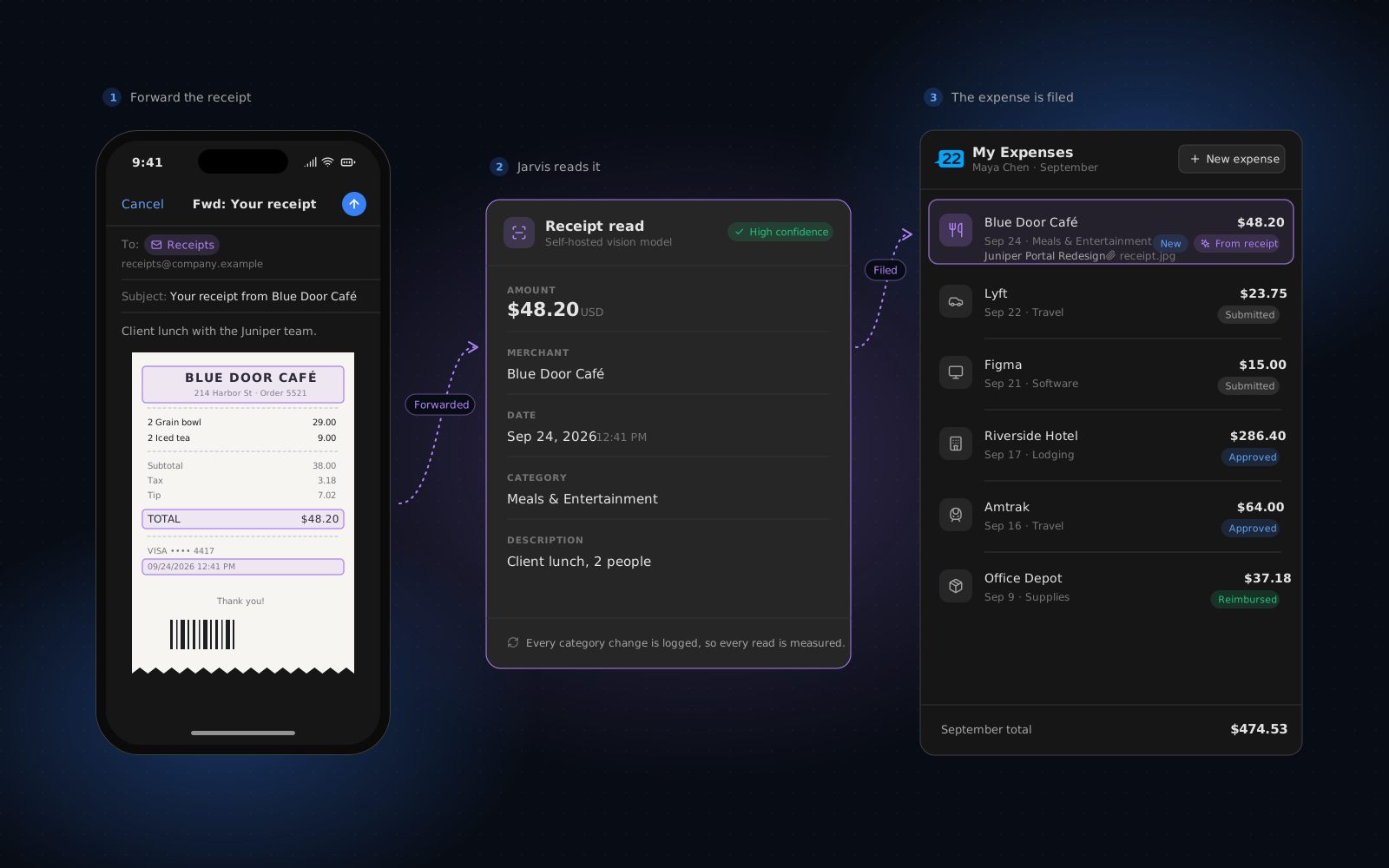
Receipts. Employees forward a receipt email, or a screenshot of a texted receipt, to a shared inbox, and the expense is drafted for them. A vision model reads the amount, merchant, date and category. About half of the expenses created in Jarvis now arrive this way. We record the AI’s suggested category next to the one each person keeps, so we measure the extractor instead of trusting it: about two in three suggestions are kept as they are.
Proposals and statements of work. Upload a proposal PDF and AI drafts a pipeline opportunity from it: client, contract type, team, deliverables, value and hours. Upload a statement of work and its tables are parsed deterministically, AI suggests activities on top, and a PM reviews the draft plan before it feeds the estimate. If the AI step fails, the flow carries on without it.
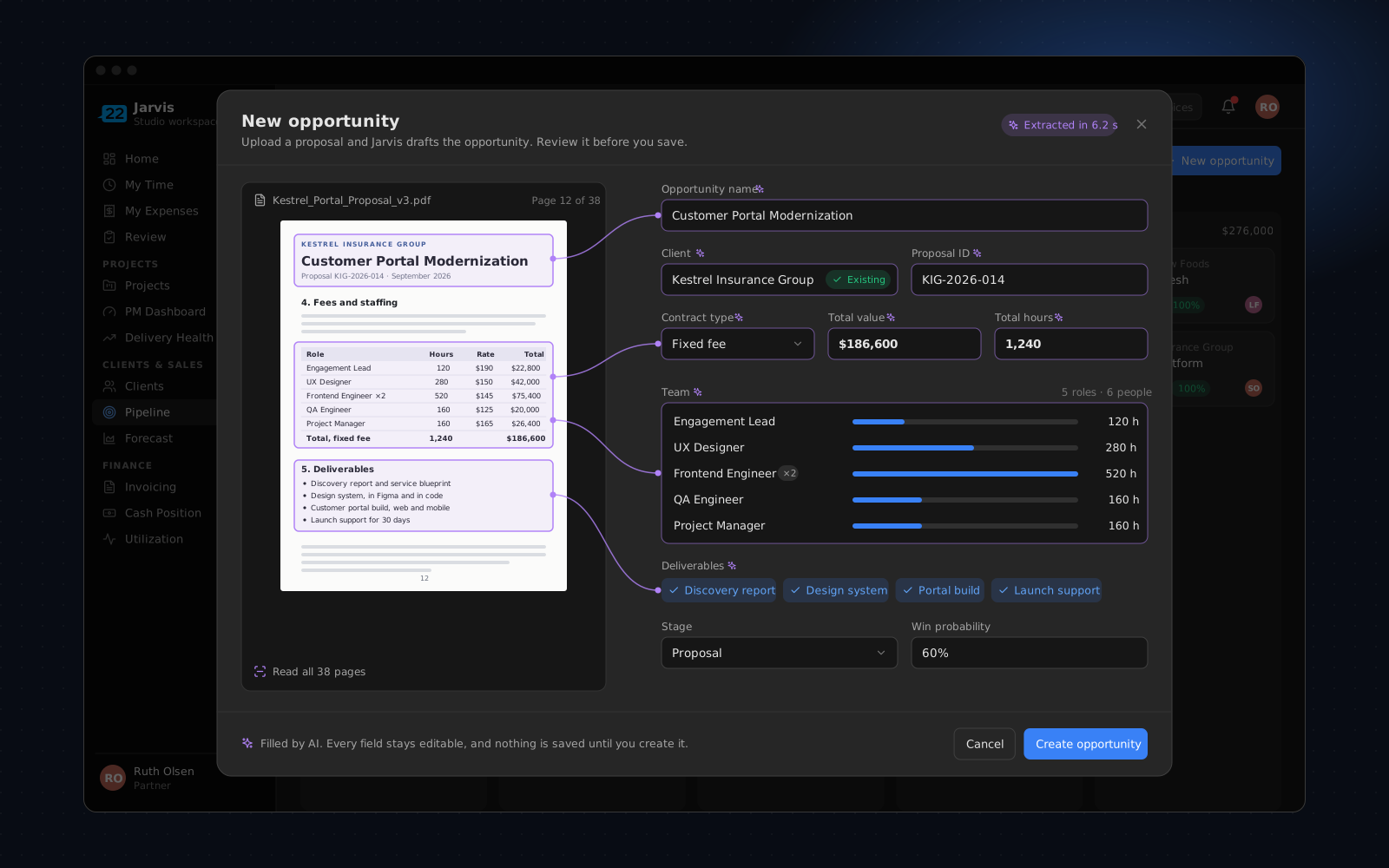
Receipts, project health scores and document tagging run on models we host on our own infrastructure. The one exception, proposal extraction, uses a hosted model, and a person reviews every field before anything is saved.
What we’d tell you before you build your own
- Keep the system of record you trust. We kept our accounting system and connected to it. Building doesn’t mean replacing everything.
- Plan the coexistence, not the cutover. Most of the engineering that made this safe went into running the old and new systems side by side.
- Give every pilot user a finish line. “Tried it” isn’t adoption. One complete cycle is.
- Measure the AI instead of trusting it. Record what people change, starting on day one.
- Budget for owning it. A platform you build is a platform you maintain. We still ship improvements to Jarvis every week, and that’s the real price of a system that fits.
Jarvis also covers the rest of how we run: clients and contacts, cash flow across our US and Mexico entities (including debt and forecasts), utilization and capacity, the people directory, and equipment tracking with custody history. Those are other stories.
Replacing a legacy platform?
Whether it’s your content platform, your portal or the tools that run your business, the hard part is the move, not the build. Talk to us about your migration.
Topics
- AI & data
- Inside Base22